Photography Tips & Guides
How to Price Extra Images So Clients Actually Buy Them
Learn how to sell more photos to clients by pricing extra images with clear tiers, anchors and limits that make upgrading feel easy rather than pushy.
PixoProof Team4 min read
Wondering how to sell more photos to clients? Make the next step feel obvious and fair: a clear included package, simple pricing tiers and a natural moment to upgrade. The numbers below are hypothetical, so plug in your own.
Why extra images often go unsold
Most clients love more photos than their package includes. The problem is rarely desire. It is friction, confusion or a feeling that the price came out of nowhere.
Common blockers include:
The client does not know how many images are included
Per-image pricing feels like a meter running
There is no clear deadline, so the decision drifts
They already screenshotted the extras they wanted
Fix those, and pricing becomes much easier to get right.
Start with a clear base package
Your base package sets the anchor for everything else. If clients are unsure what they already have, any extra feels like a surprise bill.
State the included number plainly in your booking materials, contract and gallery invitation. "Your session includes 15 edited images" is better than "a selection of edited images". Clarity now saves awkward conversations later.
How to sell more photos to clients with tiered pricing
A single per-image price is simple, but it can make clients count every click. Tiers encourage bigger choices because the value per image improves as they go up.
Here is a hypothetical structure. These are example figures only, not market rates.
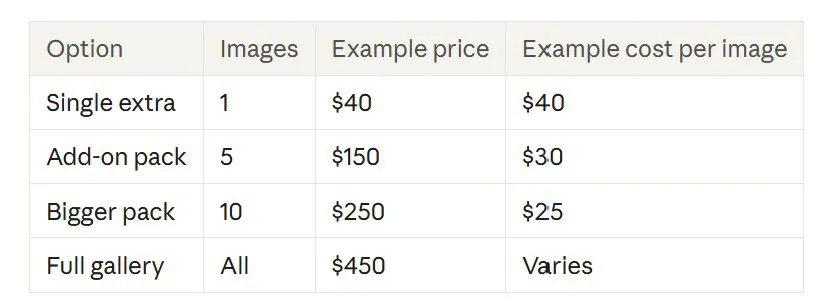
In this example, a client wanting three extras might pay $120 as singles. Seeing that five costs $150 makes the pack feel like the smarter move. You have not pushed anyone, you have just shown the maths.
Use a full-gallery option as your anchor
The full-gallery price does two jobs. Some clients will buy it, which is great. Others will see it and feel the mid-tier packs are reasonable by comparison.
Set it high enough that it rewards your work, but not so high that it feels absurd. Think of it as the ceiling that gives the rest of your menu context.
A worked example from start to finish
Say you deliver a family gallery of 60 images, with 15 included. The client hearts 24 favourites. That leaves 9 they love but have not paid for.
Using the hypothetical tiers above:
Buying 9 singles would cost $360
Two five-packs would cost $300 and cover 10 images
The full gallery at $450 covers everything
Most clients in this spot will look closely at the two five-packs. Some will stretch to the full gallery because "it's only $150 more for all of them". Either way, the decision is clear and the client feels in control.
Make the upgrade moment natural
Timing matters as much as price. The best moment to offer extras is when the client is actively choosing and has hit their included limit.
That is when they feel the pain of leaving a favourite behind. A gentle prompt like "You've chosen your 15. Want to add a five-pack for the rest of your favourites?" lands far better than an email two weeks later.
Other timing tips:
Set a selection deadline and mention it in your invitation
Offer a short early-decision bonus, such as a free extra image
Remind clients before the gallery expires, not after
Protect the value of the extras
Extras only sell if they are not freely available. If a client can screenshot their nine favourites, your five-pack is competing with "free".
Most clients are not trying to steal. They are doing what their phone makes easy. Your job is to make paying the easiest path, not the only ethical one.
Watermarks, preview sizes and download controls all help. So does a calm line in your contract about image use, which keeps expectations clear without sounding accusatory.
Keep the language friendly, not salesy
How you describe extras affects how they feel. "Additional image fees" sounds like a penalty. "Add more of your favourites" sounds like an invitation.
A few swaps that help:
"Extra charges" becomes "add-on packs"
"You've exceeded your limit" becomes "You've picked your 15"
"Full gallery fee" becomes "Keep every image"
How PixoProof supports this workflow
PixoProof is built around the selection moment. You set a selection limit for each gallery. Once a client reaches it, the rest of the gallery locks and they are ready to submit. That is your natural cue to offer an add-on pack.
Clients choose in the PixoProof mobile app for iOS and Android, where screenshots and screen recording are blocked. Each attempt is reported to your dashboard and by email. Dynamic watermarks with the client's name or email add another layer of deterrence.
Clients can heart favourites and build multiple named lists, so you see exactly which extras they want. Gallery expiry reminders help you nudge before the deadline passes. Selections then arrive with notes, ready for Lightroom.
The takeaway
Clear packages, simple tiers and good timing do most of the selling for you. Protect the images that carry the value, and let clients upgrade because it genuinely makes sense.
Start free at pixoproof.com. Your Photos. Your Rules.