Photography Tips & Guides
Maternity Session Workflow: From Shoot Day to Final Gallery
A clear, step-by-step maternity photography workflow from booking and shoot day to proofing, selections, editing and final gallery delivery.
PixoProof Team4 min read

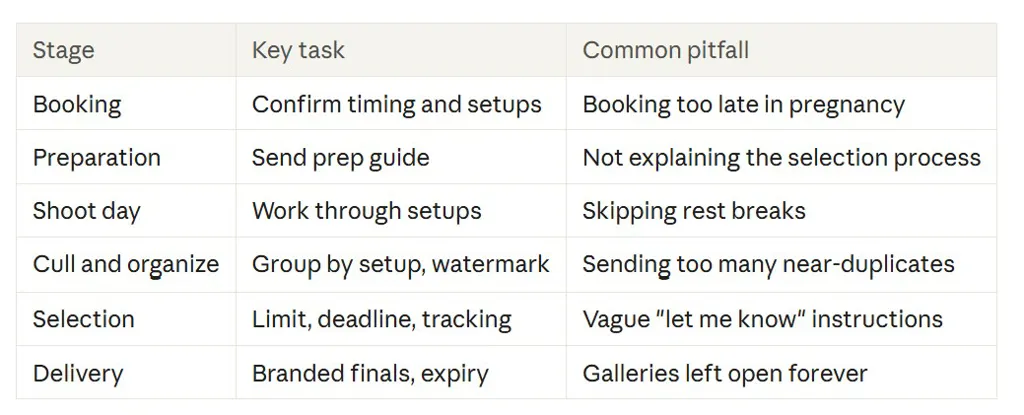
A smooth maternity photography workflow has six stages: book at the right time, prepare the client, shoot with a plan, cull and organise, run a simple selection, then deliver finals with care. Get each handover right and the whole process feels calm, for you and for an expecting parent with plenty on their mind.
Step 1: Book at the right moment
Timing is everything with maternity sessions. Many photographers suggest shooting somewhere in the third trimester, when the bump is clearly visible but the client is still comfortable.
At booking, confirm:
Estimated due date and preferred session window
Location: studio, outdoors or at home
Whether partners, children or pets will join
Wardrobe plans, including any gowns you provide
Whether they're also booking a newborn session
Bundle maternity and newborn bookings where it suits your business. It saves the client a second decision later.
Step 2: Prepare your client
A prepared client is a relaxed client, and relaxed clients photograph beautifully. Send a short prep guide a week or two before the shoot.
Include:
What to wear. Colours, fabrics and fit that flatter a bump.
What to bring. Comfortable shoes, water, snacks and a spare outfit.
What to expect. How long the session runs and how often you'll take breaks.
What happens after. When the proof gallery arrives and how selection works.
That last point is often skipped. Explaining it now means fewer "so what happens next?" emails later.
Step 3: Shoot with a plan
On shoot day, work from a loose shot list grouped by setup. This keeps the session efficient and makes culling easier later.
A typical structure:
Studio or posed: gowns, fabric and classic profile shots
Partner and family: connection, hands on bump, siblings
Outdoor or golden hour: natural light and movement
Details: hands, ultrasound images, rings, small keepsakes
Build in rest breaks. Your client's comfort matters more than squeezing in one more setup.
Step 4: Cull and organise
Back at your desk, cull ruthlessly. Keep the strongest version of each pose and remove near-duplicates.
Then organise the proof gallery by the same setups you shot. Clients can choose a few favourites from each section instead of scrolling one long feed. It also shows off the variety of the session.
Before sending, apply watermarks and decide on download permissions. Proofs generally shouldn't be downloadable at full size until selections are made and the package is finalised.
Step 5: Run a simple selection
This is where many workflows slow down. Keep it simple and time-bound.
Send the gallery with a clear invitation. Include the selection limit and deadline.
Suggest a method. Heart everything they love, then narrow down to their limit.
Encourage notes. Let clients flag retouch requests on specific images.
Track progress. Know who has opened, started and submitted.
Follow up based on activity. A different nudge for "not opened" versus "almost done".
Partners often want input. Suggesting separate shortlists, then comparing, prevents a lot of back-and-forth.
Step 6: Edit and deliver finals
Once selections arrive, bring them into your editor and work through any notes. Having the client's picks as a list of file names saves a lot of manual searching.
Deliver finals in a polished, branded gallery. Offer web-size files for sharing and full-size files for printing, if your package includes them. Then set an expiry date and remind clients to back everything up.
Your maternity photography workflow at a glance
A worked example
Say you shoot four setups and keep 15 strong images from each. That's a 60-image gallery in four tabs. Set a limit of 15 and a two-week deadline.
Your client hearts favourites over a couple of evenings, adds two retouch notes and submits. You copy the file names into your editor and start work the same day. No email archaeology required.
Bonus: plan the newborn handover
Many maternity clients come back for a newborn session. If they've booked both, mention it in your final delivery email. Duplicating a gallery setup or preset for the newborn session saves time later.
How PixoProof fits this workflow
PixoProof covers Steps 4 to 6. Photo Sets group your gallery into tabs like Studio, Golden Hour and Details. Dynamic watermarks can include the client's name or email.
Clients make selections in the mobile app for iOS and Android, where screenshots and screen recording are blocked. Every screenshot attempt is reported to your dashboard and by email. You decide whether they also get web access and whether downloads are allowed there.
Set a selection limit and the gallery locks when they reach it. Clients leave notes on individual photos. The live activity feed and funnel show where they stall. Selections arrive ready for Lightroom. Album presets and duplication make the next session faster to set up.
The takeaway
A great maternity workflow is just six clear steps, each with a tidy handover. Plan the shoot, organise the gallery and make selection easy. Your clients get a calm experience, and you get your evenings back.
Start free at pixoproof.com. Your Photos. Your Rules.