Photography Business
Cake Smash Sessions: Handling Hundreds of Near-Identical Photos
Cake smash photography tips for culling, delivering and helping parents choose from hundreds of near-identical photos, without burning hours or patience.
PixoProof4 min read
A cake smash session can produce hundreds of frames that look almost the same, and that's a problem for you and the parents. The best cake smash photography tips aren't about the shoot itself; they're about what happens after. Cull with a clear system, deliver in small sections, and give parents a simple way to choose.
Why cake smash galleries get out of hand
Toddlers don't hold a pose. You shoot in bursts, waiting for the perfect frosting face, and suddenly you have 40 frames of one moment.
Each frame is slightly different. A hand moved, the eyes opened, a crumb landed on a cheek. To a parent, every one of them is precious.
That's the trap. If you show everything, parents freeze. If you show too little, they wonder where the rest went.
Cake smash photography tips for faster culling
Culling a cake smash is a different job from culling a wedding. You're not choosing between moments; you're choosing between micro-variations of the same moment.
Try this three-pass approach:
Technical pass. Reject anything soft, blinking or badly framed. Be ruthless here, because it's objective.
Moment pass. Group frames by moment: the first touch, the face plant, the laugh, the bath. Keep the strongest one to three per moment.
Story pass. Check the gallery flows from clean outfit to full mess to bath time. Fill gaps if a key moment is missing.
Rules that keep you honest
If two frames need a side-by-side to tell apart, keep only one.
Expressions beat composition. A great face with a slightly off crop wins.
Keep one wide, one mid and one close for each big moment if you have them.
Set a target gallery size before you start, so you're culling towards a number.
Say you shot 600 frames. A clear technical pass might halve that. Grouping by moment and keeping the best few per group could bring you to a gallery of 60 to 80. That's a number parents can actually enjoy.
Structure the gallery so parents can choose
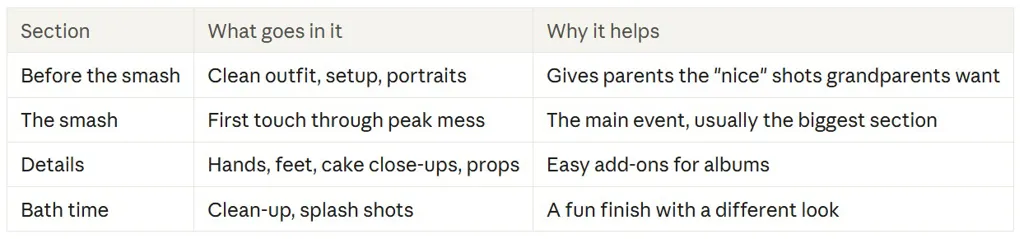
How you organise the gallery matters as much as how many images are in it. A single scroll of 80 frosting photos still feels like a wall.
Help parents pick without the stress
Parents often want to choose together, usually after the toddler is asleep. Make it easy to do in short bursts.
Give them a simple brief:
Tell them the number. "Your package includes 15 images" removes guesswork.
Suggest a method. Heart every favourite first, then trim down to the number.
Encourage notes. If they want frosting cleaned off a cheek or a stray hand removed, ask them to say so on that photo.
Set a deadline. A week or two is plenty. Without a date, the gallery sits forever.
Expect a few near-duplicates in their selections, even after your cull. That's normal. If two chosen frames are very similar, it's fine to suggest swapping one for something from a different section.
Deliver with protection in mind
Cake smash images are shareable, which is lovely and risky. Parents love posting "the face" before they've even chosen.
A few protective habits:
Watermark proofs so screenshots aren't print-ready.
Control downloads until the order or selection is final.
Use private access rather than an open public link.
Be realistic. No tool can stop someone photographing a screen with another device. Protection is about reducing casual copying, not guaranteeing it never happens.
Make the workflow repeatable
Cake smash sessions tend to come in waves, especially if you run themed mini sessions. A repeatable setup saves hours.
Build a template for your gallery sections, your welcome message and your follow-up reminders. Reuse it for every cake smash client, then tweak only the names and dates.
How PixoProof fits cake smash workflows
PixoProof is a secure client gallery and proofing platform that suits high-volume, near-identical sessions like cake smash. Use Photo Sets to split the gallery into tabs such as Before, Smash, Details and Bath. Album presets and duplication let you reuse the same structure for every session.
Parents make selections in the iOS or Android app, where screenshots and screen recording are blocked. Every screenshot attempt is reported to your dashboard and by email. They can heart favourites, build named lists and leave retouch notes on individual photos.
Set a selection limit to match the package, and the rest of the gallery locks once they reach it. Dynamic watermarks include the client's name or email. When selections arrive, copy the file names straight into Lightroom.
The bottom line
Hundreds of near-identical frames are part of the cake smash deal. A clear cull, a sectioned gallery and a simple selection brief turn that mess into a smooth handover.
Start free at pixoproof.com. Your Photos. Your Rules.