Photography Business
Why Clients Ghost After the Shoot (and How to Fix It)
Clients not choosing photos after the shoot? Learn why clients ghost on their gallery and the simple follow-up system that gets selections back on time.
PixoProof4 min read

When clients go quiet after the shoot, it is rarely because they don't care. Most clients not choosing photos are overwhelmed, unsure what to do next, or simply have no deadline. Fix the friction, add a clear finish line, and follow up with a system instead of guilt.
Why clients go quiet after the shoot
You delivered a beautiful gallery. They loved the session. Then nothing for three weeks.
Before you assume the worst, look at the common reasons clients stall:
Too many choices. Two hundred lovely images and no guidance feels like homework, not a treat.
No clear deadline. "Whenever you're ready" means "never" for a busy parent.
Unclear instructions. They don't know how many to pick, how to mark them or where to send the list.
Decision by committee. One partner wants to choose together, and that conversation keeps getting pushed back.
Clunky access. Lost email, forgotten password, a link that doesn't play nicely on their phone.
They already have what they want. Sometimes the screenshots are "good enough", so the urgency disappears.
Most of these are workflow problems, not relationship problems. That's good news, because workflow problems can be fixed.
Set expectations before the gallery lands
The best follow-up starts before the shoot. If clients know the process in advance, the gallery feels like the next step rather than a surprise task.
Cover these points in your booking confirmation or welcome guide:
When the gallery will arrive.
How many images are included in their package.
How long they have to choose.
What happens if they miss the window (extension fee, gallery archive, or a default selection by you).
Put the deadline in writing and repeat it when the gallery goes out. A date on the calendar beats a vague "soon" every time.
Make choosing feel easy, not like homework
If your gallery feels like a spreadsheet, people will procrastinate. Reduce the mental load and selections speed up.
A few practical moves:
Cull harder. Ten near-identical frames make every choice feel high stakes. Show your best, not your everything.
Group the gallery. Split images into sections like "Family", "Details" or "Outdoors" so clients can work in small bites.
Give a target number. "Pick your favourite 25" is easier than "choose what you like".
Suggest a method. Tell them to heart everything they love first, then narrow down. Two passes feel lighter than one big decision.
Make it phone-friendly. Most clients will browse on the couch, on their phone, in short bursts.
A follow-up sequence for clients not choosing photos
You don't need to chase daily. You need a calm, predictable sequence that runs the same way for every client.
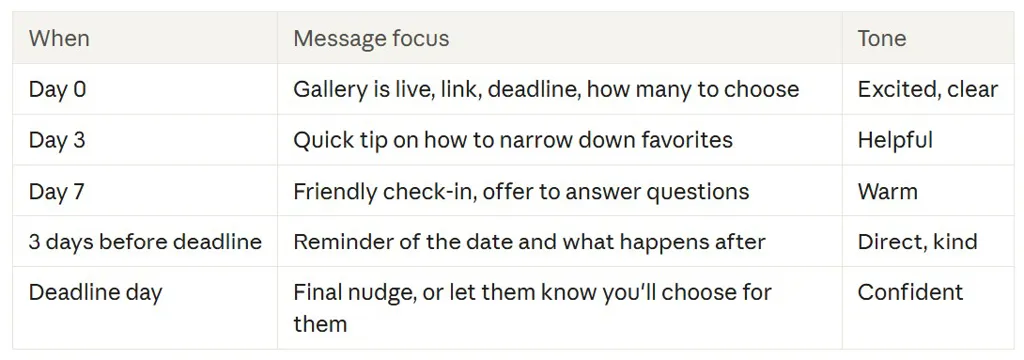
Sample wording you can borrow
"Hi Sarah, just a friendly reminder your gallery closes for selections on Friday. If it helps, start by hearting every image you love, then trim down to your 20. Any questions, just reply here."
Notice there's no apology and no pressure. You're helping them finish something they want to finish.
Watch where clients get stuck
Guessing is exhausting. If you can see whether a client opened the gallery, you can tailor the follow-up.
Never opened it? The link may be buried. Resend it through a different channel, like a text or WhatsApp.
Opened but no favourites? They may feel overwhelmed. Send the "heart first, narrow later" tip.
Lots of favourites but no submission? They're probably over the limit. Remind them of the number and offer to help trim.
Say you shoot 100 sessions a year and a quarter of clients stall for two extra weeks. That's a lot of open loops sitting on your to-do list. Knowing exactly where each one is stuck turns a vague chase into a five-minute task.
Handle the true ghosts gracefully
Some clients will still disappear. Decide your policy now, so you're not making it up under stress.
Options that keep things professional:
Choose a selection on their behalf based on your best work.
Archive the gallery and offer reactivation for a set fee.
Extend once, with a firm new date.
Whatever you pick, state it in your contract and your welcome guide. Then follow it consistently, because consistency is what makes it feel fair.
How PixoProof helps clients finish
PixoProof is built to remove the friction that causes ghosting. Clients receive a branded invitation by email or WhatsApp, open a private link with a PIN, and make selections in the iOS or Android app.
You can split the gallery into Photo Sets, such as Studio or Golden Hour, so choosing feels manageable. Clients heart favourites, create named lists and leave notes on individual photos. Set a selection limit, and once they reach it the rest of the gallery locks so they're ready to submit.
The live activity feed shows invites, gallery opens and selections as they happen. Analytics include a funnel that shows where clients stall, so your follow-up matches what's actually happening. Gallery expiry reminders help keep deadlines front of mind. When selections arrive, copy the file names straight into Lightroom and get editing.
The bottom line
Clients rarely ghost on purpose. Give them a clear number, a clear date and an easy way to choose, and most will happily finish.
Start free at pixoproof.com. Your Photos. Your Rules.