Client Proofing & Delivery
Best Client Proofing Galleries for Photographers in 2026
online proofing gallery, photo proofing software, secure client gallery, Pixieset alternative, ShootProof alternative, screenshot protection for photographers
PixoProof TeamUpdated 16 min read
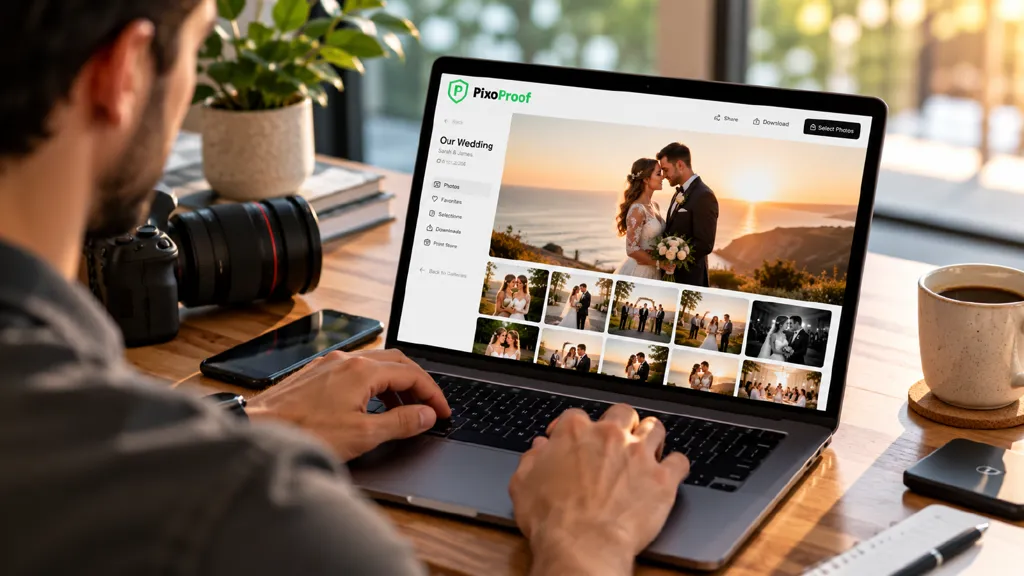
A proofing gallery is where a session becomes a sale. Your client opens the link, hearts their favourites, submits a selection, and you get a clean list to edit, print or upsell from. No more "the one where Grandma is laughing" emails.
The basics look the same everywhere. The differences show up after that: how clients make selections, whether the gallery protects your previews from screenshots, whether clients can view in a real app, how storage is priced, and what the platform takes from your sales.
We compared 15 client proofing galleries on proofing tools, image protection, client experience, branding and real cost in October 2026. Yes, PixoProof is on the list. We built it, so we've been upfront about where other tools do things better.
Quick answer:
Best for protecting unpaid proofs (newborn, maternity, family, portrait): PixoProof. Native iOS and Android client apps, screenshot blocking on Android, screenshot alerts on iOS, and a switch to turn web access off per gallery.
Best familiar, polished delivery: Pixieset.
Best for contracts and invoices alongside galleries: ShootProof.
Best for album proofing and automated print sales: Pic-Time.
Best for pre-edit RAW proofing with drawn markup: picdrop.
Best for huge wedding guest galleries with face search: Aftershoot Galleries.
What is a client proofing gallery?
A client proofing gallery is a private, branded online gallery where clients review your images, mark favourites, leave notes and submit a final selection. The selected images then go to editing, printing, an album or an add-on purchase.
"Proofs" are the images a client chooses from. They might be unedited previews, lightly edited JPEGs or watermarked low-res files. Either way, they haven't been paid for yet.
Proofing gallery vs delivery gallery vs protected gallery
Delivery gallery: hands over finished, paid-for work. Download buttons are the point.
Proofing gallery: collects decisions first. Favourites, selection limits, comments and a submitted list matter more than downloads.
Protected proofing gallery: a proofing gallery built on the assumption that clients will try to keep proofs without buying them. It adds screenshot deterrence, download permissions, PIN access and alerts.
That last category matters most if you sell per image. A newborn session with 60 proofs and a 15-image package only works if clients can't quietly screenshot the other 45.
15 best client proofing galleries at a glance
Prices are in USD per month, billed annually, unless noted. Checked October 2026.
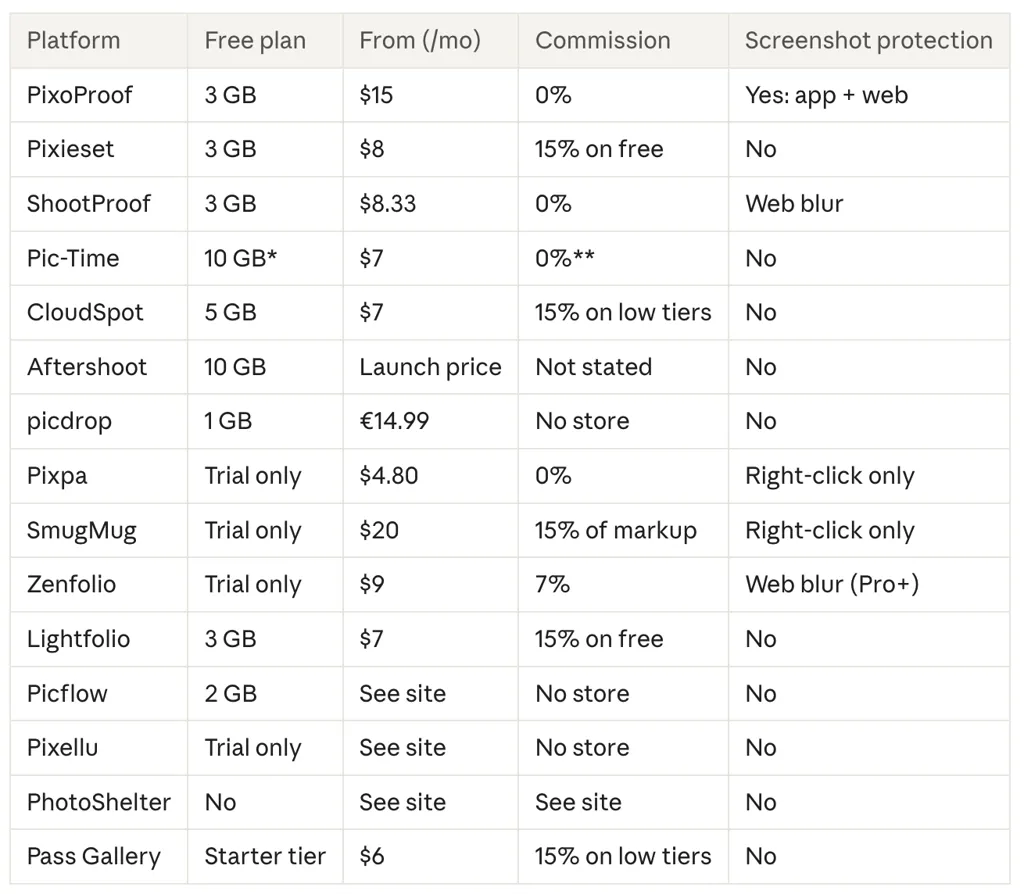
*Drops to 3 GB after three months. **On self-collected payments, Professional plan and up.
How we evaluated these proofing galleries
We checked each platform's live pricing page and help centre in October 2026 and scored them on six things:
Proofing tools: favourites, selection lists, selection limits, comments, markup, and how easily selections get back to your editing software.
Image protection: watermarks, PIN or password access, download permissions, link expiry, and what happens when a client tries to screenshot.
Client experience: how simple it is on a phone, and whether clients get a real app or just a browser tab.
Branding: logo, colours, custom domain, and removing the platform's branding.
Sales and commission: store, lab fulfilment, and the commission on the plan you'd actually buy.
Storage model: gigabytes, photo counts or gallery counts, and what "unlimited" really costs.
Prices change often. Monthly billing usually costs 15–30% more than annual.
The 15 best client proofing galleries for photographers
1. PixoProof
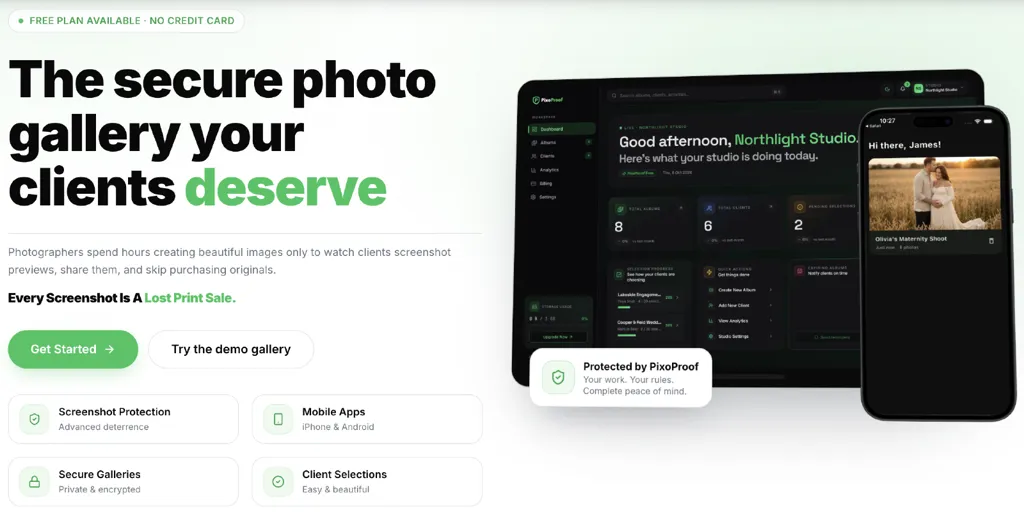
PixoProof is built around one question most gallery tools skip: what stops a client from keeping the proofs without paying for them?
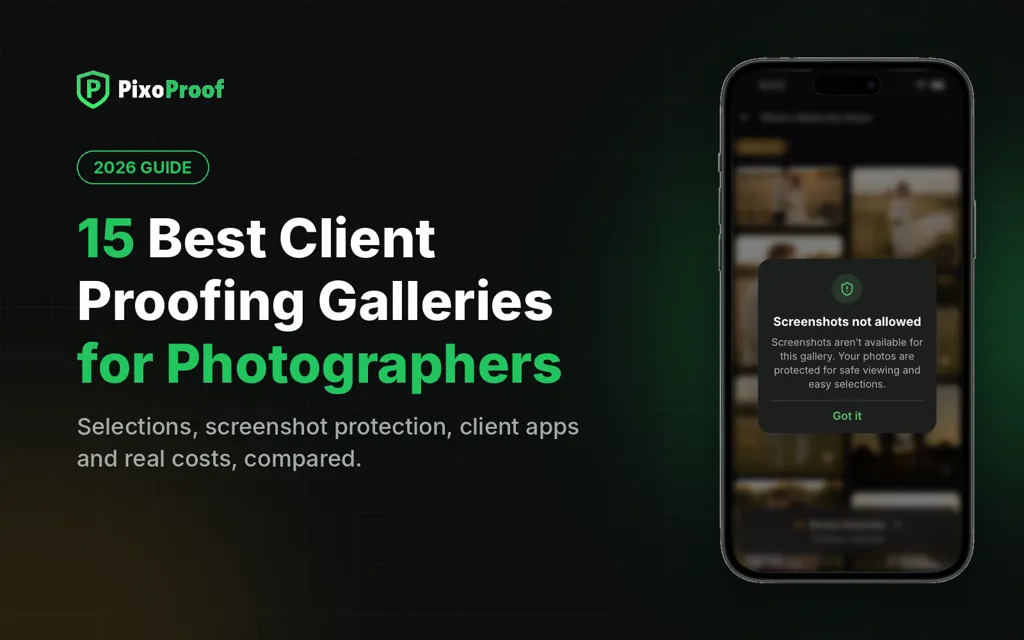
Your clients view proofs in free native iOS and Android apps, or in the browser if you allow it. On Android, the app blocks screenshots and screen recording outright. On iOS, where Apple doesn't allow blocking, the app tells you the moment a client takes a screenshot. In the browser, the gallery hides the image when a capture is attempted. And if a gallery is too precious for the browser, such as a newborn or boudoir session, you can switch web access off so it opens in the app only.
Here's what that looks like in practice: a client screenshots image 23, you get the alert, and you send a friendly "Love that one too? I can add it to your package for $15." A potential lost sale becomes an upsell.
The rest of the proofing workflow is covered too. Clients favourite images and submit selection lists. You add PIN access, custom watermarks on previews, download permissions and link expiry, then watch views, selections and downloads in a live activity feed.
Pricing is simple: every plan has every feature, and paid plans only add storage. Free (3 GB), Essential ($15/month, 20 GB), Professional ($25/month, 250 GB) and Studio ($40/month, 1 TB). Yearly billing saves a month. PixoProof takes no commission. See pricing.
Pros
Native iOS and Android client apps, free for your clients
Screenshot and screen-recording blocking on Android, screenshot alerts on iOS
Turn web access on or off per gallery
PIN access, watermarked previews, download permissions and link expiry
Live activity: see who viewed, selected and downloaded
Auto hide after client submit the gallery, fully protected
Every feature on every plan, including Free; 0% commission
Cons
New platform, so fewer independent reviews than established players
No built-in print store or lab fulfilment yet *In Progress
No contracts, invoicing or album design
No tool can stop a client photographing the screen with another phone
Best for
Newborn, maternity, family, cake smash and portrait photographers who sell per image or by package and need unpaid proofs to stay unpaid.
2. Pixieset
Pixieset is the gallery most of your clients have already used, and that familiarity counts. Nobody needs instructions to heart a photo or download. Galleries are minimal and fast, there's a print store, and Pixieset's wider suite adds a website builder and Studio Manager for contracts and invoices.
The free plan includes 3 GB and unlimited galleries but takes 15% of store sales. Paid Client Gallery plans billed annually are Basic ($8, 10 GB), Plus ($16, 100 GB), Pro ($24, 1 TB, adds RAW support) and Ultimate ($40, unlimited). Every paid plan removes the commission. See Pixieset pricing.
Pros
The most familiar client experience in the category
Usable free plan with unlimited galleries
Branded mobile gallery apps
Cons
15% commission on the free plan
Contracts and invoices need Studio Manager or a suite plan
No screenshot protection advertised
Best for
Photographers who want polished delivery and print sales with almost no client learning curve.
3. ShootProof
ShootProof pairs galleries with the paperwork most gallery tools leave out. Every paid plan includes contracts and invoices, and ShootProof takes no commission on any plan, free included.
It has also added screenshot protection. On desktop, the gallery blurs and shows your logo and a message when a screenshot is attempted, or when the client switches windows. On mobile, half of each image stays blurred and the client presses to swap halves. ShootProof itself says this deters rather than guarantees. See the help article.
Plans billed annually: Free (3 GB, photos only), Starter ($8.33, 20 GB), Standard ($16.67, 100 GB), Professional ($26.67, 1 TB photo + 50 GB video) and Premium ($50, unlimited photo + 150 GB video). There's a 14-day trial. See ShootProof plans.
Pros
Contracts and invoices on every paid plan
0% commission on every plan
Browser-based screenshot deterrence
Cons
The half-blur on mobile changes how clients see their own photos
Gallery design is less editorial than Pic-Time or Pixieset
No face search
Best for
Portrait, family and school photographers who want galleries, contracts and invoices in one subscription.
4. Pic-Time
Pic-Time is built around what happens after the gallery goes live. Automated campaigns keep selling prints from delivered galleries, and it's one of the strongest options for album proofing. A Lightroom integration syncs client selections back to your catalogue.
Plans billed annually: Free (10 GB, dropping to 3 GB after three months), Beginner ($7, 20 GB), Professional ($21, 100 GB) and Advanced ($42, unlimited). Client selections and album proofing start on Professional. Client face and selfie search is Advanced only. There's no commission on Professional and Advanced when you collect payments yourself. See Pic-Time pricing.
Pros
Album proofing and selections inside the gallery
Automated print marketing
Lightroom sync for client selections
Cons
Selections and album proofing need Professional or higher
Free storage shrinks after three months
No contracts or invoices built in
Best for
Wedding photographers who sell albums and prints and want the gallery to keep selling after delivery.
5. CloudSpot
CloudSpot's standout is the client's phone. Galleries install as branded mobile apps, where clients can favourite, download, share and buy. Full Suite plans add contracts, invoicing and a CRM.
The Free plan (5 GB, three galleries) and Entry plan ($7/month, 15 GB) are JPEG-only and take 15% of store sales. Lite ($17), Pro ($34) and Unlimited ($50) are commission-free and accept more file types. Promotions change often, so check the renewal price. See CloudSpot pricing.
Pros
Branded mobile gallery apps
Studio tools on Full Suite plans
Cons
15% commission on the two cheapest plans
No screenshot protection advertised
Best for
Portrait and family photographers whose clients view and buy mostly on their phones.
6. Aftershoot Galleries
Aftershoot Galleries is the newest big name here, and its strength is size. Face detection and keyword search let a bride find every frame with her grandmother in it, and Face Gating shows guests only the photos they appear in. If you already cull and edit in Aftershoot, finished images move straight into a gallery without re-uploading.
The free Starter plan includes 10 GB of photo storage and 1 GB of video, with photo and video delivery, proofing, a print store and free migration from Pixieset, Pic-Time and ShootProof. Paid plans are on launch pricing. See Aftershoot Galleries.
Pros
Face search and Face Gating for very large galleries
Photos and video in one gallery
Free migration from the big three
Cons
No native client app or screenshot protection advertised
No contracts, invoices or album design
Best for
Wedding and event photographers delivering thousands of images to long guest lists.
7. picdrop
picdrop has the deepest feedback tools on this list. Clients can mark images with colours, vote, comment and draw directly on a photo to show exactly what they want retouched. It accepts RAW and video, so clients can proof before you edit.
The free plan has 1 GB and three galleries. Paid plans are Pro (€14.99/month, 500 GB), Advanced (€39.99/month, 1 TB) and Business, with annual billing saving two months. Prices are before VAT. See picdrop pricing.
Pros
Drawn markup, colour markers and voting
RAW and video proofing on every plan
Based in Europe
Cons
No store or print sales
No client app or screenshot protection
Best for
Commercial, editorial and retouch-heavy portrait work where precise feedback matters more than sales.
8. Pixpa
Pixpa is a portfolio website builder with client galleries built in, so your site, blog, proofing galleries and store share one subscription. Proofing covers favourites, comments and ratings, and there's 0% commission on sales.
There's no free plan, only a 15-day trial with no card needed. Standalone gallery plans start around $4.80/month billed annually, and all-in-one website plans from $5.40. See Pixpa pricing.
Pros
Website, galleries and store on one bill
0% commission
Low starting price
Cons
No free plan
No client app or screenshot protection
Best for
Photographers who want their portfolio site and proofing galleries under one login.
9. SmugMug
SmugMug makes sense when your gallery is also your archive. Every plan includes unlimited photo storage, and galleries have strong privacy and password controls plus a Lightroom plugin.
The catch is cost. Plans billed annually run from $20/month (Direct) to $37/month (Pro), selling starts on Portfolio, RAW storage is a paid add-on, and SmugMug keeps 15% of your markup on sales. There's a 14-day trial and no free plan, as noted in Aftershoot's comparison.
Pros
Unlimited photo storage on every plan
Strong privacy controls
Cons
15% fee on your markup
Lighter proofing tools than dedicated platforms
Best for
Event, sports and volume photographers who need unlimited storage.
10. Zenfolio
Zenfolio combines a photography website, client galleries, a store and BookMe scheduling. Selling starts on the Professional plan, and Advanced adds unlimited photo storage and 4K video. Since June 2026, Professional and Advanced also include screenshot protection: a blocking overlay on desktop when a screenshot shortcut is pressed, and a partial blur on mobile that clients touch and hold to reveal.
List prices are $9, $23 and $40 a month billed monthly, with annual discounts. Every order carries a 7% commerce fee plus payment processing. There's a 14-day trial and no free plan, per Aftershoot's comparison.
Pros
Website, galleries and booking from one vendor
Established lab network, plus browser screenshot deterrence on Professional and up
Cons
7% fee on every order
The Basic plan can't sell
Best for
Photographers who want website, galleries and scheduling in one place.
11. Lightfolio
Lightfolio is designed for selection before editing. Clients make picks, save them across devices and message you inside the gallery. An optional studio bundle adds projects, contracts, invoices and questionnaires.
The free plan includes 3 GB, three galleries and takes 15% of sales. Paid plans billed annually are Lite ($7, 30 GB), Starter ($12, 100 GB), Pro ($20, 1 TB) and Premium ($40, unlimited), all with unlimited galleries and 0% commission. See Lightfolio pricing.
Pros
Built for pre-edit client selection
In-gallery messaging with clients
Generous storage for the price
Cons
Free plan capped at three galleries with 15% commission
No client app or screenshot protection advertised
Best for
Photographers who run a selection round before editing.
12. Picflow
Picflow is built for review rounds rather than print sales. Clients and collaborators can favourite, colour-label, comment, annotate and approve images, with version control and approval limits. Reviewers don't need a paid seat, which suits shoots with an art director, a client and a retoucher.
The free plan has 2 GB with no time limit. Paid plans are Plus (100 GB), Pro (1 TB) and Biz (5 TB), with a 7-day trial and a discount for annual billing. Picflow changes its prices often, so check Picflow pricing.
Pros
Strong approval tools, annotations and version control
Unlimited free reviewers
Watermarks and password protection
Cons
No store or print sales
No client app or screenshot protection
Best for
Commercial and editorial photographers proofing with teams.
13. Pixellu SmartGalleries
Pixellu comes at galleries from the album side: it's the company behind SmartAlbums. SmartGalleries are minimal and fast, with favourites, download permissions, passwords and album previews. Paired with SmartAlbums Cloud Proofing, clients can approve album spreads online.
There's a free trial with no card required, and plans are priced separately from SmartAlbums. See SmartGalleries.
Pros
Clean, fast galleries
Album design and album proofing from one company
Cons
No print store
No client app or screenshot protection advertised
Best for
Wedding photographers who design albums in SmartAlbums.
14. PhotoShelter
PhotoShelter is closer to a digital asset manager than a consumer gallery. It supports RAW files, has archive-grade search and organisation, and offers Lightroom and Photo Mechanic plugins. That suits photographers delivering to brands, teams and editors rather than families.
There's no free plan, and pricing is on PhotoShelter's own site.
Pros
RAW support and archive-grade search
Lightroom and Photo Mechanic plugins
Cons
No free plan
Built for organisations more than consumer clients
Best for
Sports, editorial and commercial photographers who need a searchable archive that also delivers.
15. Pass Gallery
Pass Gallery covers sharing, delivery and selling with a simple interface. Clients choose favourites, download in high or web resolution and order prints, and higher plans add album proofing.
Plans billed annually are Basic ($6, 20 GB), Standard ($20, 100 GB) and Unlimited ($38), with a free starter tier. Commission is 15% on the lowest tiers and 0% on Unlimited. If you cancel, galleries above the free storage limit are removed. See Pass pricing.
Pros
Low entry price
Favourites, print sales and album proofing
Cons
Commission on lower tiers
Galleries can be removed if you downgrade
No screenshot protection advertised
Best for
Photographers who want simple delivery and print sales on a budget.
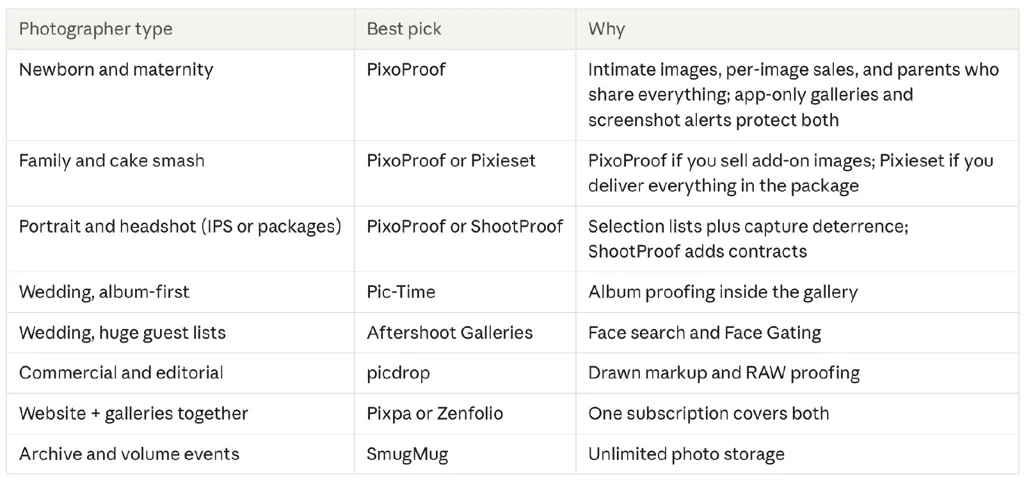
Best proofing gallery by photographer type
Commission vs subscription: the maths
Commission matters more than the monthly fee once you start selling. On $3,000 of print and add-on sales in a season, a 15% cut is $450. That's more than a full year on most mid-tier plans. Compare the commission on the exact plan you'd buy, not the headline rate.
Screenshots work the same way in reverse. If 3 newborn clients a month each screenshot 10 extra images you'd sell at $15, that's $450 a month you never see. Protection that turns even some of those into paid add-ons pays for itself quickly.
How to choose the right proofing gallery
Do you sell per image or deliver everything?
If clients pick a package and buy extras, protection is your revenue model. Look for screenshot deterrence, download permissions and a way to keep proofs off the open web. If everything is included in the fee, a clean delivery gallery is enough.
Where do your clients actually look at photos?
Most clients open galleries on their phone. Test favouriting, selecting and submitting on a phone before you commit. A native app also sits on the client's home screen, which brings them back to buy.
Do clients select before or after you edit?
Before means you need RAW support or quick preview exports. picdrop takes RAW on every plan. On JPEG-first platforms, export low-res watermarked previews for selection.
Do you sell prints or albums?
For albums, look for album proofing (Pic-Time). For prints, check the commission on the plan you'd buy and whether there's lab fulfilment.
Do you need contracts and invoices too?
ShootProof includes them on every paid plan. Otherwise, pair your gallery with a studio CRM.
Common mistakes when choosing a client proofing gallery
Comparing subscriptions without the commission. A cheap plan with a 15% cut costs more once you sell.
Treating watermarks as protection. A watermark stops reuse, not a screenshot of the selection page. Clients often crop, filter and post anyway.
Ignoring the phone. Most clients never open the gallery on a laptop.
Picking the wrong storage model. Gigabyte, photo-count and gallery-count plans reward different shooting styles. Check last year's sessions first.
Treating a free plan as a long-term plan. Free tiers can shrink storage, cap galleries or take commission.
Forgetting the exit. Check bulk export before you have 300 galleries on one platform.
Choosing your proofing gallery
Every gallery on this list handles favourites and downloads. The real differences come down to three questions: when clients select, what you sell, and what happens to the images they don't pay for.
If your income depends on clients buying beyond their package, that third question is the one that matters. PixoProof gives clients a proper app experience, keeps proofs off the open web when you want, and tells you when someone tries to keep an image without paying. You can try it on a real client gallery on the free plan, with every feature included.
Start free with PixoProof · Download the iOS app · Download the Android app
FAQ
What are proofs in photography?
Proofs are the preliminary images you show a client so they can choose what to buy, edit, print or put in an album. They're usually watermarked or low resolution until paid for.
What is the best client proofing gallery for photographers?
It depends on your workflow. PixoProof suits photographers who sell per image and need proofs protected. Pixieset suits simple, polished delivery. Pic-Time suits album proofing and print sales, ShootProof suits built-in contracts, and picdrop suits pre-edit RAW proofing.
Can clients screenshot my proofing gallery?
On most platforms, yes. Right-click blocking and watermarks don't stop a screenshot. PixoProof blocks screenshots and screen recording in its Android app, alerts you to screenshots in its iOS app, and lets you switch web access off. ShootProof and Zenfolio blur or cover galleries in the browser when a capture is attempted. No tool can stop someone photographing the screen with a second phone, so protection is about deterrence and turning attempts into sales.
Which proofing galleries have a free plan?
PixoProof (3 GB, every feature), Pixieset (3 GB), ShootProof (3 GB), CloudSpot (5 GB, three galleries), Pic-Time (10 GB, dropping to 3 GB), Aftershoot Galleries (10 GB), Lightfolio (3 GB), Picflow (2 GB) and picdrop (1 GB) all have free plans. Check commissions and limits before using one for paid work.
Do clients need to download an app to view a PixoProof gallery?
No, unless you want them to. Clients can open galleries in any browser, or in the free iOS and Android apps. You decide per gallery whether web access is on.
How do I make a private online gallery for a client?
Use a proofing platform that supports PIN or password access, link expiry and download permissions. Share the link and PIN with that client only, and switch off downloads until the order is paid.
What's the difference between a proofing gallery and a delivery gallery?
A proofing gallery collects decisions before final delivery: favourites, selections and comments. A delivery gallery hands over finished, paid-for files. Many platforms do both.
Sources
Pricing and features checked October 2026:
Aftershoot: 13 Best Online Proofing Galleries (SmugMug and Zenfolio pricing)