Protect Your Work
Watermarks in 2026: Do They Still Protect Your Work?
Does a photography watermark still protect your work in 2026? What watermarks do well, where AI removal tools beat them, and how to layer real protection.
PixoProof Team4 min read
A photography watermark still helps in 2026, but it is no longer enough on its own. AI editing tools can remove many simple watermarks in seconds. The job has shifted from blocking copying to deterring it and identifying the source. Treat your watermark as one layer in a wider system, not a lock.
What a watermark was meant to do
Traditionally, a watermark did three things. It marked ownership, made unpaid use look obviously unfinished and advertised your name when images were shared.
For years, that was a reasonable deal. Removing a well-placed mark took skill and time, so most people did not bother. Clients who wanted a clean image simply paid for it.
What changed
Consumer editing apps now include object removal and generative fill. A client with a phone can brush over a corner logo and watch it vanish. No Photoshop skills required.
That does not make watermarks pointless. It does mean the classic small logo in the bottom corner is the easiest kind to remove. If it sits over plain background, it is barely a speed bump.
The honest picture is this: no watermark is removal-proof. The question is how much effort it adds and what else it achieves.
Photography watermark styles compared
Different styles trade off deterrence against how nice the preview looks. Here is a general comparison.
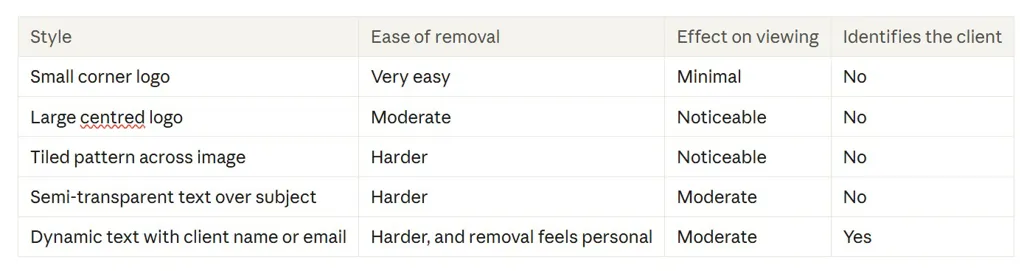
The pattern is clear. Marks that cross the subject and repeat across the frame are harder to clean up. Marks that name the viewer add a social cost on top of the technical one.
Why personalized watermarks work differently
A generic logo says "this belongs to a photographer". A watermark with the client's own name or email says "this was shared with you, specifically".
That changes behavior. Most clients are not trying to steal, they are just doing what is easy. Seeing their own name on the image is a gentle reminder that the preview is not the final product.
It also helps if an image turns up somewhere it should not. You know which gallery it came from, which makes a polite conversation much easier.
Placement tips that make removal harder
If you watermark previews, a few habits raise the effort required:
Place marks over detailed areas like hair, fabric or foliage, not flat sky
Cross the subject rather than hiding in the margin
Use a repeating or tiled pattern at low opacity
Keep preview files at web size, not full resolution
Vary placement across a gallery so no single fix works for all
You do not need to ruin the viewing experience. Low opacity and thoughtful placement can keep images beautiful while still making clean copies inconvenient.
What watermarks cannot do
Watermarks do nothing about screenshots of a clean final image. They also cannot stop someone photographing a screen with a second device. Nothing can, and any tool claiming otherwise is overselling.
They also do not replace clear expectations. If your contract says nothing about image use, a client may genuinely believe a screenshot is fine. Education and agreements do a lot of quiet work.
Building a layered approach
Think of protection as layers, each covering a different gap. A practical stack might look like this:
Contract terms that explain what clients can and cannot do with previews
Personalised watermarks on proofs and previews
Web-size previews so full-resolution files are only delivered after purchase
Screenshot controls where the viewing environment allows them
Download controls so clients only get files you have approved
Say a client views 80 proofs with a corner logo, no screenshot controls and full-size downloads. Every layer is open. Now imagine personalised marks, blocked screenshots and downloads turned off until they order. The path to paying becomes the easiest one.
How PixoProof handles watermarking
PixoProof includes dynamic watermarks that add the client's name or email to their gallery. It is the personalised layer described above, applied automatically.
It also covers the gaps watermarks cannot. Clients make selections in the PixoProof mobile app for iOS and Android, where screenshots and screen recording are blocked. Every attempt is reported to your dashboard and by email.
Web access is optional. You decide whether clients can use the web gallery and what they can do there. On the web, the page blurs when the client switches away, and downloads are controlled by toggles. When you are ready, downloads can be offered in original or web size.
The bottom line
Watermarks still matter, but their role has changed. Use them to deter and identify, not to guarantee, and back them up with good contracts and smart delivery.
Start free at pixoproof.com. Your Photos. Your Rules.