Using the Activity History
PixoProof Academy: Tracking Client Activity in PixoProof: Opens, Selections and Downloads
The Activity History is a complete, newest-first log of what has happened across your studio: client invitations, gallery visits, submitted selections, uploads, album changes, downloads, screenshot alerts, and referral milestones.
Opening the Activity History
- Go to your Dashboard.
- In the Recent Activity section, click View all activity.
The Activity History page opens with your full log.
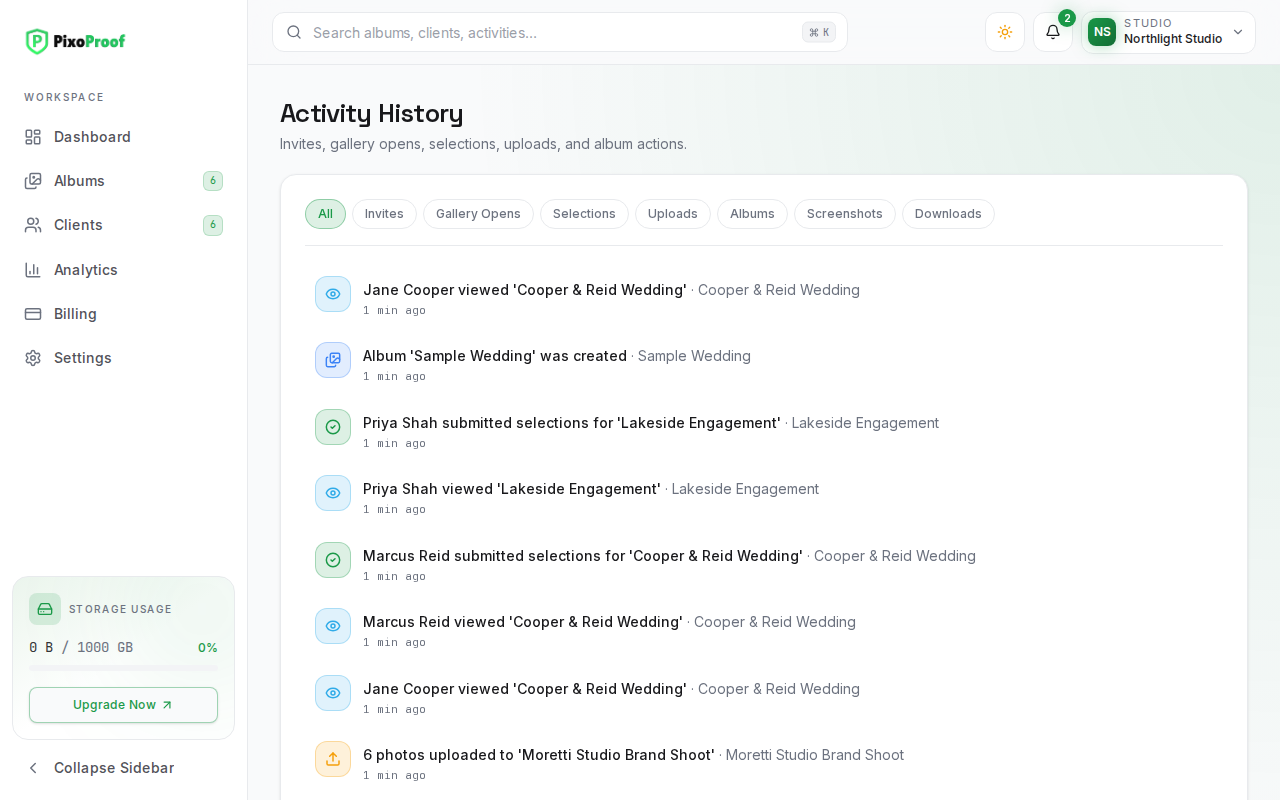
What Each Entry Shows
Every entry has an icon for its type, a short description, the album it relates to (after a ·), and how long ago it happened (for example, "5 min ago" or "Just now").
Events That Appear
| Event | Example wording | Filter |
|---|---|---|
| A client is invited to an album | "Anna Lee was invited to 'Smith Wedding'" | Invites |
| A client opens their gallery | "Anna Lee viewed 'Smith Wedding'" | Gallery Opens |
| A client submits selections | "Anna Lee submitted selections for 'Smith Wedding'" | Selections |
| Photos are uploaded | "Photos uploaded to 'Smith Wedding'" | Uploads |
| An album is created, archived, expires, is reactivated, or is hidden after expiry | "Album 'Smith Wedding' was created", "Expired album 'Smith Wedding' was hidden" | Albums |
| A screenshot is detected in a client gallery | "Anna Lee took a screenshot in 'Smith Wedding'" | Screenshots |
| A client downloads photos, or a ZIP download fails | "ZIP download failed for 'Smith Wedding'" | Downloads |
| Referral milestones: an invitation you sent, a photographer signing up through your referral, a referral starting a paid plan, and referral credit being added | "Referral credit was added to your account" | All only |
Screenshot alerts are reported at most once per minute for the same client and album, so a burst of screenshots appears as a single entry.
Filtering the Log
Use the filter pills at the top of the list: All, Invites, Gallery Opens, Selections, Uploads, Albums, Screenshots, and Downloads.
Filters apply to the entries already loaded on the page. If a filter shows "No matching activity for this filter.", scroll down on All to load older entries, then filter again.
Loading Older Activity
The page loads a first batch of entries and fetches older ones automatically as you scroll to the bottom. A spinner at the bottom shows that more entries are loading.
How Up to Date Is It?
The Activity History is not a live stream. It is refreshed when you open the page and when you return to the browser tab after being away for a short while. To be told about new events the moment they happen, use the notification bell in the top bar (see How to Manage Studio Notifications & Delivery Preferences).
Activity History or Analytics?
- Use Activity History to see what happened and in which album, one event at a time.
- Use Analytics to see how much happened over a time range, with totals, charts, and conversion rates.