Album Activity
The Activity tab gives you a timeline of everything that has happened in one album, so you can see at a glance whether your clients have opened the gallery, downloaded photos, or submitted their selection.
To open it, go to your album and click the Activity tab.
What the Timeline Shows
Entries are listed newest first. Each one has an icon for the type of event, a short description, and how long ago it happened. For client events, the client's email address is shown under their name.
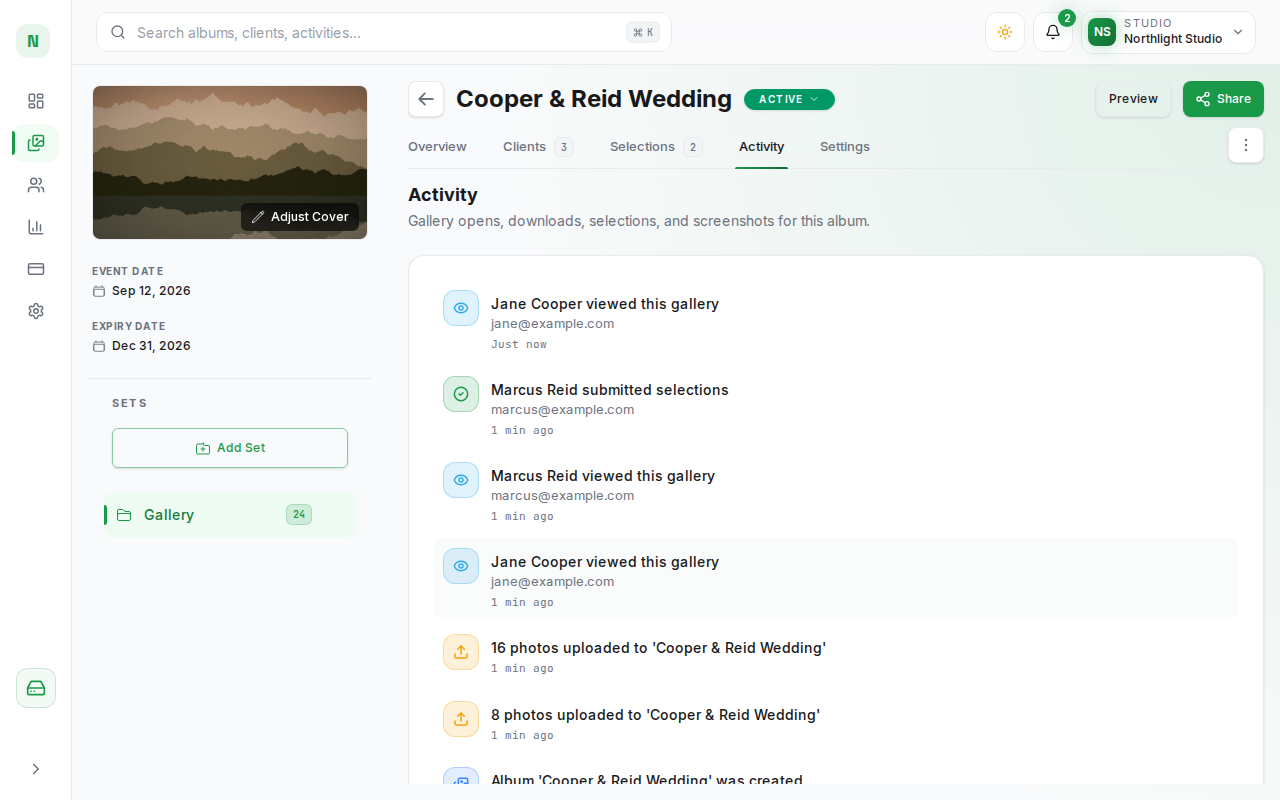
You will see entries such as:
| Event | Example |
|---|---|
| A client opened the gallery | Anna viewed this gallery |
| A client downloaded photos | Anna downloaded 12 photos as ZIP |
| A client submitted their selection | Anna submitted selections |
| A screenshot was detected | Anna took a screenshot |
| A client was invited | Anna was invited |
| Photos were uploaded | Photos uploaded to 'Smith Wedding' |
| The album was created, archived, expired, or reactivated | Album 'Smith Wedding' expired |
| A gallery ZIP could not be prepared | ZIP download failed for 'Smith Wedding' |
Older entries load automatically as you scroll down.
If nothing has happened in the album yet, the tab shows No activity yet.
Tips
- Use the Activity tab to confirm that a client has actually opened the gallery before you send a reminder.
- A ZIP download failed entry means PixoProof could not prepare a gallery download for your client, even after retrying automatically.
- To see activity across all of your albums at once, open Activity History from the View all activity link in the Recent Activity card on your Dashboard.