Dashboard Overview
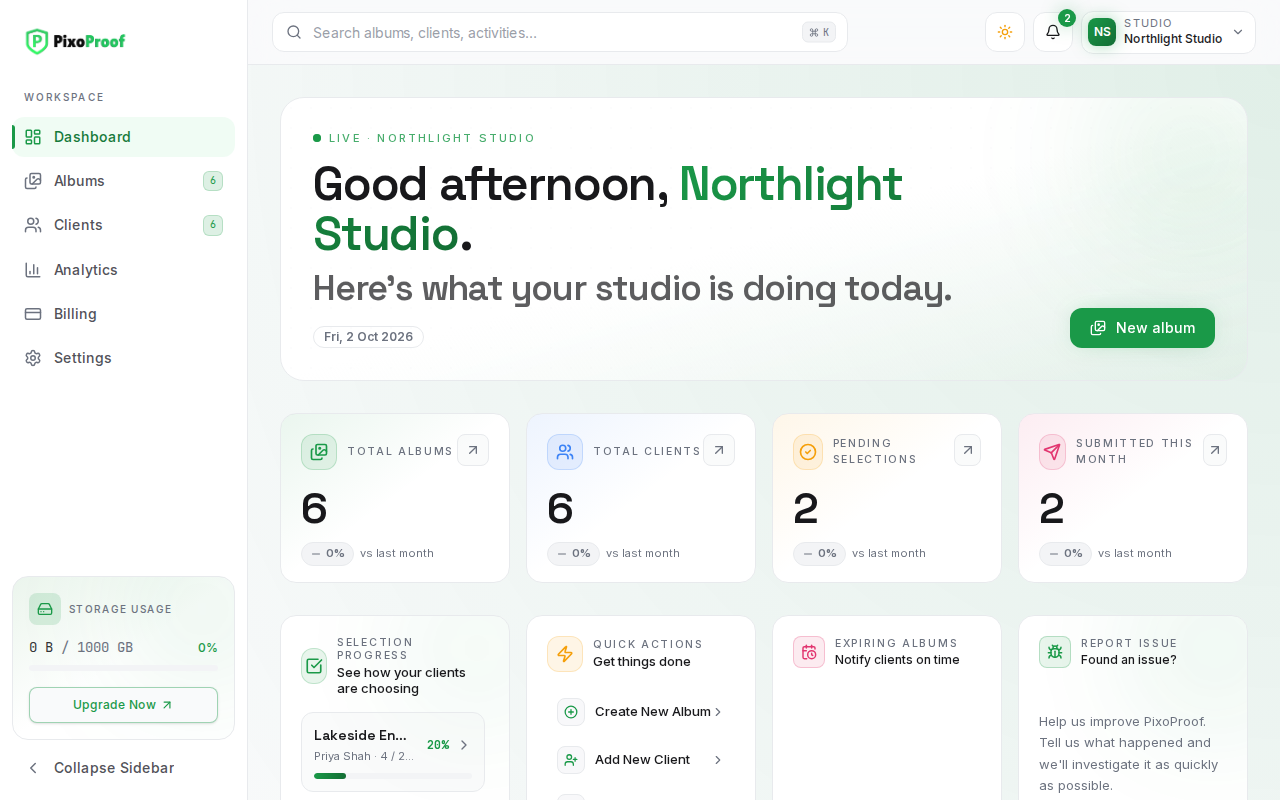
The Dashboard is the operational hub of PixoProof. Upon signing in, you receive an immediate summary of active projects, client selections in progress, deadlines, and quick navigation shortcuts.
Summary Metrics
The top row displays real-time statistics across your entire photography studio:
Total Albums The count of albums in your workspace, including hidden (draft), active, and expired galleries. Archived albums are not counted. Click the card to navigate directly to your Albums page.
Total Clients The total number of clients in your studio's client directory. Click to view and manage your full Clients list.
Pending Selections Counts client selections that have been started but not yet submitted. This highlights projects requiring follow-up.
Submitted This Month Tallies the selection sets successfully completed and submitted by your clients within the current calendar month, reflecting your ongoing workflow velocity.
Quick Actions
Positioned in the central workspace, the Quick Actions card accelerates routine studio tasks:
- Create New Album — Opens the Albums page with the Create Album dialog ready to name a new client album.
- Add New Client — Opens the Clients page, where Add client creates a contact before you connect them to an album.
- View Analytics — Opens the Analytics page.
- Studio Settings — Opens Settings.
Selection Progress
Provides immediate visibility into client shortlisting activity. For each active project, you can monitor how many photos the client has selected against their contracted selection limit (e.g., 14/20 selected), giving you advance insight before they officially submit.
Expiring Albums
Monitors galleries approaching their configured expiration dates. Click Send reminders to email the clients of those albums in one step, or open an album to change its expiry date before automatic actions (such as hiding or deletion) occur. Clients already reminded about the same expiry date are skipped.
Report Issue
Provides a direct feedback channel to report technical issues, UI problems, or workflow bugs directly to the development team, helping maintain platform reliability.
Recent Albums & Recent Activity
Below the cards, Recent Albums shows your latest non-archived albums (with View all albums), and Recent Activity lists invites, gallery opens, selections, uploads, album changes, and downloads, with filters and a link to the full activity history.
Storage Usage & Navigation
The persistent left sidebar shows your storage usage (used versus your plan's limit; click it to upgrade) alongside the primary navigation: Dashboard, Albums, Clients, Analytics, Billing, and Settings.